QA Automation best practices for e-commerce platforms in 2025
January 17, 2025
Introduction
Quality assurance (QA) automation has become the backbone of successful e-commerce platforms in 2025.
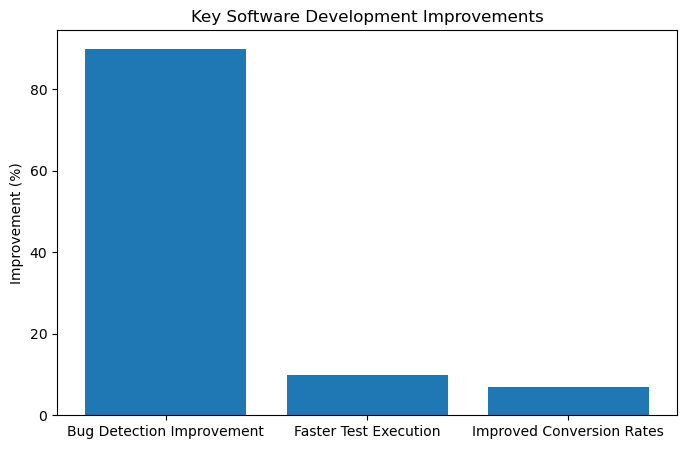
Online retailers face fierce competition and ever-rising user expectations, even a one-second delay in page load can cut conversion
rates by up to 7% (ECommerce QA Testing in 2025 Improve Your Conversion Rates).
To stay ahead, e-commerce businesses are investing heavily in test automation to ensure every release is fast, reliable, and bug-free.
In fact, 72% of successful companies now integrate test automation into their deployment process to accelerate development cycles and reduce
manual errors (30+ Test Automation Statistics In 2025- Testlio).
Automation not only speeds up testing but also improves quality: studies show over 60% of companies see a positive
ROI from automated testing tools, and defect detection rates can jump by as much as 90%
compared to manual testing (30+ Test Automation Statistics In 2025- Testlio)
(30+ Test Automation Statistics In 2025- Testlio).
In this blog post, we’ll explore best practices for QA automation on e-commerce platforms, focusing on functional UI, API, and
visual testing, and how modern tools like Playwright, Cypress, and Applitools can be leveraged to deliver a seamless shopping experience.
The Importance of QA Automation in E-commerce (2025)
E-commerce is a 24/7 business, new features, sales campaigns, and updates roll out continuously.
Manual testing alone cannot keep pace with this rapid change.
QA automation enables continuous testing as part of CI/CD pipelines, catching issues early and often.
Fast feedback from automated tests helps development teams iterate quickly without compromising quality.
This is vital in 2025’s DevOps-driven workflows where code is deployed to production frequently.
Automated tests act as a safety net that guards critical user flows (search, add-to-cart, checkout, payments) on every build.
For e-commerce owners, this means fewer broken carts or payment glitches reaching customers and ultimately higher customer satisfaction and conversion rates.
In short, robust test automation is no longer optional;
it’s a strategic advantage that ensures your online store remains fast, reliable, and consistent across browsers and devices.
Best Practices for QA Automation in E-commerce
To maximize the benefits of automation, QA teams should follow a set of best practices.
These practices help create scalable, stable test suites that cover the necessary functionality without slowing down development.
Let’s break down the key pillars of effective test automation in e-commerce:
Scalable Test Automation Frameworks
Design your test framework for scale and maintainability from day one.
As your e-commerce application grows (more pages, features, and integrations), your tests should be easy to extend and
resilient to changes (Best Practices for Writing Scalable Playwright Test Scripts).
Adopting a modular design pattern like the Page Object Model (POM) is highly recommended (Best Practices for Writing Scalable Playwright Test Scripts).
POM involves creating reusable page classes that encapsulate locators and interactions for each page or component of your site.
This way, if a UI element changes (say the cart button ID or CSS), you update it in one place in the page object, rather than in hundreds of test scripts.
The result is a cleaner, DRY (Don’t Repeat Yourself) test codebase that’s easier to maintain over time.
Additionally, leverage fixtures or setup/teardown hooks provided by your test framework to handle repetitive
setup tasks like launching a browser, logging in, or seeding test data
(Best Practices for Writing Scalable Playwright Test Scripts).
Centralizing setup and teardown logic prevents duplication and makes it simpler to run tests in different contexts (local vs. CI, different user roles, etc.).
Overall, a well-structured framework (with clear abstractions, utilities, and reusable components) will support large test suites and team collaboration as your e-commerce platform scales.
CI/CD Integration and Continuous Testing
Integrating test automation into your CI/CD pipeline is crucial for fast feedback.
Every code change should trigger automated tests in a continuous integration system (Jenkins, GitHub Actions, GitLab CI, etc.),
so bugs are caught early in the development cycle. In 2025, QA automation and DevOps go hand-in-hand a recent survey shows that
continuous integration and delivery have been key drivers of automation adoption (Jenkins is used by ~35% of teams, and test frameworks
like Cypress by ~28% as part of CI) (30+ Test Automation Statistics In 2025- Testlio).
Make sure your tests can run headlessly (without UI) and in parallel to speed up execution in the pipeline.
Parallel testing is a best practice that significantly cuts down total execution time by running test cases concurrently across multiple machines or containers.
Also, use environment variables or configuration files to easily switch endpoints and credentials for different environments (staging, QA, production)
within your pipeline. Treat test code with the same rigor as production code: version control it, code-review it, and monitor test results on each pipeline run.
By gating deployments on test success, you ensure that only builds that pass all critical tests reach your live e-commerce site preventing costly issues
in production (30+ Test Automation Statistics In 2025- Testlio).
Ultimately, tight CI/CD integration means you achieve continuous testing automated tests run continuously as part of development,
providing confidence to release faster and more often.
Cross-Browser and Cross-Device Testing
E-commerce users access sites on a myriad of browsers (Chrome, Safari, Firefox, Edge) and devices (desktop, tablet, various mobile phones). A key best practice is to test across all target browsers and device viewports to ensure a consistent shopping experience for everyone (Ecommerce Testing: How Best To Test Online Stores). Cross-browser testing catches layout issues or functionality bugs that appear in one browser but not others (for example, a CSS layout might break in Safari, or a feature might behave differently in mobile Safari vs desktop Chrome). Use automation tools that support multiple browser engines for instance, Playwright can run tests on Chromium, WebKit, and Firefox with a single test script. You should maintain a browser matrix (a list of browsers, browser versions, OS, and devices that your customers use most) and include those in your test suite. Cloud testing services or device labs can help run your tests on real devices for mobile coverage. As a best practice, prioritize real user environments: “Use real devices rather than simulators to accurately represent the user experience” (Ecommerce Testing: How Best To Test Online Stores). Automated cross-browser tests can be integrated into your pipeline or run on a schedule, so you get quick alerts if, say, a new browser update causes a compatibility issue. By doing thorough cross-browser and cross-device automation, you protect your site’s responsiveness and functionality for all users whether they’re shopping on a Windows laptop with Chrome or an iPhone with Safari.
Handling Flaky Tests
Flaky tests those that sometimes pass and sometimes fail without code changes are the bane of test automation. In large e-commerce suites, even a small percentage of flaky tests can erode trust in the automation results and slow down releases. It’s critical to identify and fix flakiness proactively. Flaky tests often stem from timing issues (e.g. a test clicks before an element is ready), external dependencies, or shared state between tests (
Managing Test Flakiness | TestComplete
). Best practices to reduce flakiness include using robust sync/wait mechanisms, isolating test data, and cleaning up state between tests. Make use of your framework’s implicit waits and retry loops for example, both Playwright and Cypress will auto-wait for elements to appear and actions to complete, so rely on those instead of arbitrary sleeps. Ensure that each test case can run independently; if tests have inter-dependencies (e.g., Test B relies on data created in Test A), one failure can cause a cascade (
Managing Test Flakiness | TestComplete
). Instead, reset the state or create fresh data in each test (using APIs or database scripts) so that tests don’t “bleed” into each other. Stable locators are also essential tests become flaky if they rely on UI selectors that change frequently. Avoid extremely fragile selectors like dynamically generated IDs or complex CSS selectors that break on layout changes. Use resilient identifiers (we’ll discuss this more under tool-specific tips). When flakiness does occur, allocate time each sprint to diagnose and fix it (
Managing Test Flakiness | TestComplete
). Many teams implement a “flaky test management” strategy: monitor test results, quarantine flaky tests (so they don’t block the pipeline), and fix them before reintroducing. By keeping your test suite stable, you ensure that when a test fails it’s due to a real bug not a script hiccup giving everyone confidence in the automation.
Data-Driven and Parameterized Testing
E-commerce platforms involve many variations in data: multiple user roles, product categories, payment methods, promotion codes, languages, and so on. Rather than writing a separate test for each combination, adopt data-driven testing to reuse test logic with different input data sets. Most automation frameworks support parameterization for instance, Playwright’s test runner allows test parameterization so you can run the same test function with an array of data inputs (Best Practices for Writing Scalable Playwright Test Scripts). Similarly, in Cypress or other frameworks, you can drive tests with external JSON/CSV data files or environment configurations. Using data-driven tests improves coverage without code duplication. For example, you might have one login test that tries multiple user credential combinations, or one checkout test that iterates through different payment types (credit card, PayPal, gift card) pulled from a data file. This approach ensures you cover edge cases and various user scenarios important in e-commerce (like an international customer versus a domestic customer) without writing entirely new tests for each. When implementing this, separate test data from test code keep data in config files, fixtures, or databases so it’s easy to update without touching the code. Data-driven testing not only reduces maintenance (one test script to update for many scenarios) but also makes your test suite more comprehensive by systematically covering combinations that might be missed with ad-hoc individual tests. It’s a powerful practice to maximize ROI on your automation more test coverage for relatively little additional effort.
Tool-Specific Best Practices and Examples
Modern QA teams have an array of automation tools at their disposal. Here we focus on three popular tools Playwright, Cypress, and Applitools each excelling in different aspects of testing. We’ll discuss how to get the best out of each tool in an e-commerce context, along with real-world example scenarios and code snippets.
Playwright for Functional UI Testing
Playwright is a cutting-edge framework for end-to-end web testing, known for its speed, reliability, and cross-browser support. It’s ideal for automating functional UI tests in an e-commerce site think of scenarios like searching for a product, adding it to the cart, and completing checkout. To use Playwright effectively, leverage its strengths in parallelism and browser control. For instance, Playwright can launch tests in multiple browsers (Chromium, WebKit, Firefox) simultaneously, which is great for cross-browser coverage without extra effort. You can define projects in the Playwright config to run the same test suite in different browsers. Also, utilize Playwright’s robust waiting mechanisms: actions like page.click() or page.fill() automatically wait for the element to be ready, and you can await specific conditions (like page.waitForLoadState() or assertions) to avoid race conditions. A best practice in Playwright (as mentioned earlier) is to implement the Page Object Model to organize your selectors and actions per page (Best Practices for Writing Scalable Playwright Test Scripts). This makes your test code more readable and resilient for example, a ProductPage class might have methods like addToCart() or getPrice() which encapsulate the selector details. Another tip is to use fixtures and the built-in test runner (@playwright/test for Node.js) to set up common scenarios. You can create a fixture for an authenticated state login once in a setup step and reuse the browser context for tests that require a logged-in user, saving time.Here’s a real-world Playwright test example simulating an e-commerce user flow (in TypeScript syntax using Playwright’s test runner):
import { test, expect } from '@playwright/test';

test('User can search and add a product to cart', async ({ page }) => {
    // Go to homepage
  await page.goto('https://myecommerce.com');

  // Search for a product
  await page.fill('input[aria-label="Search"]', 'Wireless Mouse');
  await page.press('input[aria-label="Search"]', 'Enter');

  // Click on the first product in results
  await page.click('.product-listing >> nth=0');

  // Verify product detail page loaded
  const productTitle = await page.textContent('h1.product-title');
  expect(productTitle).toContain('Wireless Mouse');

  // Add the product to cart
  await page.click('button.add-to-cart');

  // Open cart and verify the item is added
  await page.click('a[aria-label="View Cart"]');
  const cartCount = await page.textContent('.cart-count');
  expect(cartCount).toBe('1');
});
In this script, we navigate the site’s UI just like a real user: searching for an item and adding it to the cart. Playwright’s selectors and assertions help ensure each step worked (for example, checking the product title and cart count). Notice the use of accessible selectors (aria-label and semantic classes) this is intentional to make the test more stable. Playwright best practice: use meaningful attributes or test IDs in your HTML for selectors (e.g., data-test-id) instead of brittle XPath or lengthy CSS selectors (Best Practices for Writing Scalable Playwright Test Scripts). Also, this test will run headless in CI by default and can be easily configured to run in multiple browsers for cross-browser verification. By following these practices modular design, proper waiting, good selectors, and parallel execution Playwright can deliver fast and reliable UI test automation for your e-commerce app.
Cypress for API and Asynchronous Testing
Cypress has exploded in popularity for front-end testing due to its developer-friendly design and powerful capabilities to test modern web applications. While Cypress is often used for UI tests on single-page applications, it’s also extremely useful for API testing and handling asynchronous behavior in your app. One of the best practices with Cypress is to test API endpoints directly using cy.request for efficiency. For example, rather than setting up a UI scenario to test a backend order API, you can call that API with Cypress and validate the JSON response in milliseconds. This is especially useful in e-commerce for testing backend services (product search APIs, user profile APIs, etc.) as part of your integration tests. Cypress commands are inherently asynchronous but elegantly managed the framework queues commands and waits for their completion, so you typically don’t need to manage promises yourself (How to handle Cypress Asynchronous Behavior? | BrowserStack) (How to handle Cypress Asynchronous Behavior? | BrowserStack). The key is to embrace Cypress’s style: chain commands and use .then() or .should() for assertions, rather than mixing in random waits or async/await which can disrupt its internal timing. Avoid explicit setTimeout or fixed delays; instead let Cypress wait for elements or XHR calls. Cypress provides hooks like cy.intercept() to stub or spy on network requests. A best practice is to use cy.intercept to control external calls (for example, stub out calls to a third-party payment service during a test) to make tests deterministic and faster. You can also wait on network calls with cy.wait('@alias') to ensure asynchronous operations have finished before making assertions. This is crucial to eliminate flakiness in SPA scenarios where actions trigger background API calls. Another Cypress tip is to leverage its automatic retry on assertions for instance, using cy.get().should('have.text', '...') will keep retrying until the text appears or timeout, so you don’t need manual retry loops.To illustrate Cypress’s strengths, here’s an example of using Cypress for API testing and async control:
// Cypress test to verify an API endpoint and UI update
describe('Product API and UI integration', () => {
    it('should fetch product details via API and display in UI', () => {
        // Test the API directly
    cy.request('/api/products/12345').then(response => {
        expect(response.status).to.equal(200);
      expect(response.body).to.have.property('name', 'Wireless Mouse');
      expect(response.body).to.have.property('price');
    });

    // Now test the UI uses this API
    cy.intercept('GET', '/api/products/12345').as('getProduct');
    cy.visit('/product/12345');
    cy.wait('@getProduct').its('response.statusCode').should('eq', 200);
    // Assume the product name should appear on the page after API call
    cy.get('h1.product-title').should('contain', 'Wireless Mouse');
    cy.get('.product-price').should('not.be.empty');
  });
});
In this test, the first part directly hits the Product Details API to ensure it returns correct data (status 200 and expected fields). This is a pure API test done in Cypress without loading the UI at all it runs quickly and gives confidence that the backend works. The second part intercepts the network call when visiting the product page UI and waits for it to complete (cy.wait('@getProduct')) before asserting that the product title and price are displayed. Cypress makes it straightforward to synchronize with asynchronous behavior (like waiting for an XHR to finish) using cy.intercept and its built-in promise chain. By testing both the API in isolation and the UI integration, we cover the end-to-end scenario comprehensively. Notice we did not have to add any arbitrary sleep; Cypress took care of timing. Also, by stubbing and aliasing the request, we could even simulate different API responses (like an error case) to test the UI’s error handling. For flaky-proof Cypress tests, remember to use .should() assertions which retry, and prefer data attributes for selectors (Cypress encourages adding data-cy or data-test attributes in your HTML and using cy.get('[data-cy="elementName"]') (Cypress Best Practices For Test Automation [2024] | LambdaTest) (Cypress Best Practices For Test Automation [2024] | LambdaTest) this yields stable tests that are unaffected by layout or styling changes). Cypress also has the advantage of running in the same run-loop as the application, which means you can directly manipulate the DOM or trigger actions as needed but do so carefully to mimic user behavior and not break the realism of the test. With these best practices, Cypress becomes a powerful tool to verify both the frontend and backend of your e-commerce platform in an integrated manner, all while handling async events seamlessly.
Applitools for Visual Testing and UI Consistency
Functional tests alone aren’t enough in e-commerce you also want to ensure your site looks right. This is where visual testing comes in, and Applitools Eyes is a leader in this space. Applitools uses AI-powered visual checkpoints to catch visual regressions that functional tests might miss for example, a button that became invisible due to CSS, misaligned product images, or the wrong font showing after a update. Best practices for visual testing with Applitools include using it to complement your functional tests by adding visual assertions. Instead of manually scripting assertions for every CSS property, you simply take a screenshot and let Applitools compare it against a baseline using its AI-based image comparison. One key strategy is to verify entire pages when possible, rather than small regions, to maximize coverage (Best Practices for Automated Visual UI Testing | Applitools). This means if you navigate to the checkout page, you’d capture the full page screenshot; Applitools will flag any pixel differences from the approved baseline (with intelligence to ignore insignificantly small differences using Strict mode by default (Best Practices for Automated Visual UI Testing | Applitools)). Of course, not every difference is a bug dynamic content like rotating banners or live counters can cause false positives. The best practice here is to utilize ignore regions for elements that are not meaningful to test (advertisements, random product suggestions, etc.) (Best Practices for Automated Visual UI Testing | Applitools). You can mark those areas to be ignored during comparison so that only important visual changes fail the test. It’s also recommended to run visual tests across different viewport sizes (desktop vs mobile) and browsers this is where Applitools Ultrafast Grid shines.
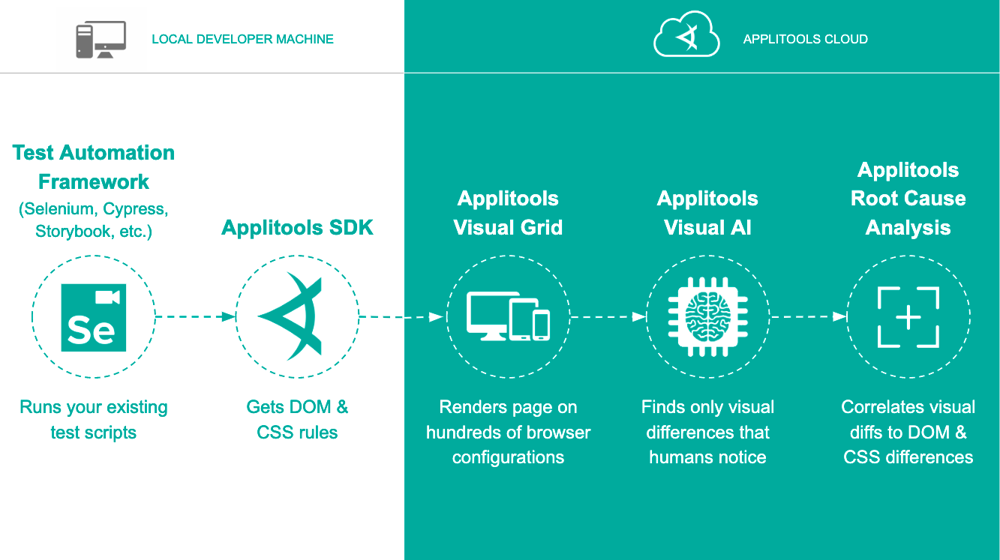
(How I ran 100 UI tests in just 20 seconds [Revisited] - AI-Powered End-to-End Testing | Applitools) (How I ran 100 UI tests in just 20 seconds [Revisited] - AI-Powered End-to-End Testing | Applitools)Applitools Ultrafast Grid enables efficient cross-browser visual testing by decoupling test execution from rendering. The diagram above illustrates how it works: your test automation (e.g., Selenium, Playwright, Cypress) runs the script once on a local machine (left side), and the Applitools SDK captures the DOM and CSS. The Ultrafast Grid (in the Applitools cloud, right side) then takes that DOM/CSS snapshot and renders the page on hundreds of browser configurations in parallel, taking screenshots of each. Applitools Visual AI compares these screenshots to baselines and finds only the meaningful visual differences that a human would notice, ignoring minor rendering variations. This whole process completes in seconds, meaning you can validate your e-commerce UI on Chrome, Firefox, Safari, Edge, and mobile browsers without actually running your test multiple times on each browser (How I ran 100 UI tests in just 20 seconds [Revisited] - AI-Powered End-to-End Testing | Applitools). The benefit is huge: ultra-fast feedback on visual consistency across platforms. To apply this in practice, you would write visual tests like this (example in JavaScript using Applitools with Playwright or Selenium):
// Pseudo-code for Applitools visual test within a Playwright test
const eyes = new Eyes();  // initialize Applitools Eyes
eyes.setBatch("Checkout Flow");  // grouping tests in a batch
await eyes.open(page, "MyECommerceApp", "Checkout page visual test");
await page.goto('https://myecommerce.com/checkout');
await eyes.checkWindow("Checkout page loaded");  // capture screenshot of full page
await page.click('button.apply-coupon');
await eyes.checkWindow("After applying coupon"); // another visual checkpoint
await eyes.close();
In this pseudo-code, we insert Applitools visual checkpoints at critical states: once when the checkout page is loaded, and again after applying a coupon code (which might, for example, highlight a discount field). Applitools will compare these screenshots to the baseline images for those states from the last approved run. If, say, a recent CSS change broke the layout of the discount field, the visual test will fail and highlight the changed region. We didn’t have to write complex assertions Applitools handles it. It’s recommended to integrate Applitools Eyes with your existing tests; both Cypress and Playwright have official integrations so you can add cy.eyesCheckWindow() or similar commands inside your tests. Also, use batching and naming conventions to organize results on the Applitools dashboard, and turn on branching or versioning of baselines if you have multiple versions of your site (e.g., for different locales or white-labels). By gating your builds with visual tests (treating them as equal to functional tests in CI) (Best Practices for Automated Visual UI Testing | Applitools), you ensure that any unintended UI blip (like a missing product image or a button that changed color and is now unreadable) doesn’t slip into production. Visual AI can catch subtle issues that manual eyeballing might miss, and it saves your testers from doing tedious pixel-by-pixel comparisons. In summary, Applitools helps maintain a polished, consistent UI/UX for your e-commerce platform across all devices crucial for brand trust and user satisfaction.
Real-World Automation Scenario
To see these tools and practices in action, let’s consider a realistic scenario: “Black Friday Sale Deployment” for an online retail site. The development team has been working on a big sale feature with special pricing, a new banner on the homepage, and a high-traffic expected surge. Before this goes live, QA automation runs a battery of tests:
Functional UI tests (Playwright): A suite of Playwright tests runs through critical flows like flash sale banner click-through, add-to-cart with discounted pricing, and checkout with a promo code. These tests execute on Chrome, Firefox, and Safari in parallel. Thanks to the scalable framework (POM design), even though the UI got a facelift for Black Friday, the QA team quickly updated a few selectors in the page objects and all tests were ready. In CI, these run in parallel and finish in minutes, verifying that the core purchase paths still work with the new sale content.
API tests (Cypress): At the same time, Cypress scripts directly exercise the pricing API and inventory API. For example, they verify that when the sale flag is on, the /api/pricing endpoint returns the discounted prices for all items, and that the /api/inventory reflects the limited-time stock levels. These API tests run lightning fast and catch any logic issues in the backend. Cypress also simulates a user adding items to the cart via API calls and then calls the checkout API to ensure orders can be placed successfully during the sale. By mocking certain responses (like simulating an out-of-stock scenario), the tests also ensure the frontend will display the correct “Sold Out” message.
Visual tests (Applitools): After the functional tests, Applitools Eyes kicks in to validate the look of the site. A set of visual tests captures screenshots of the homepage, product pages, and checkout on both desktop and mobile layouts. The Ultrafast Grid system compares these against the baseline (which was updated with approved Black Friday designs). The result? It flags a visual bug on one of the product pages, the sale badge overlaps with the product title on iPhone Safari. This bug might have been missed in functional testing, but visual AI caught it. The team fixes the CSS and re-runs the test, and now all visual tests pass, confirming the UI looks perfect on all devices.
By combining these approaches, the e-commerce business owner gets a comprehensive quality report: All critical user flows function correctly (thanks to Playwright), the backend logic is solid (thanks to Cypress), and the site’s appearance is spot-on (thanks to Applitools). This multi-faceted automation strategy hugely reduces risk: even under the intense pressure of a Black Friday deploy, the team can push updates with confidence, backed by data from their automation suite. Moreover, this automated coverage frees up the QA engineers to do exploratory testing on edge cases or performance testing for the traffic surge, rather than spending all their time on repetitive regression checks.
Conclusion
QA automation in 2025 is an indispensable element of running a successful e-commerce platform. By adhering to best practices from building scalable test frameworks and integrating with CI/CD, to executing cross-browser tests and squashing flaky tests teams can ensure their test suites are reliable and efficient. Tools like Playwright, Cypress, and Applitools each play a unique role: Playwright provides robust functional UI testing across browsers; Cypress offers fast API and integration testing with ease of handling async events; and Applitools adds a layer of AI-powered visual verification that keeps the UI consistent and user experience top-notch. The payoff for following these practices is huge: faster release cycles, higher test coverage, and ultimately happier customers who enjoy a seamless shopping experience.Key takeaways: Start with a strong foundation (modular design, data-driven tests), make your tests part of the development pipeline (continuous testing is the norm in 2025), and don’t neglect the visual side of quality. Also, keep an eye on future trends AI is increasingly assisting QA (already 40% of testers are using AI tools like ChatGPT to help generate tests (30+ Test Automation Statistics In 2025- Testlio)), and we can expect smarter self-healing tests and more low-code automation options on the horizon. For e-commerce businesses and QA engineers, embracing these modern automation practices is vital to stay competitive. A well-oiled automation suite not only catches bugs but also gives teams the freedom to innovate rapidly, knowing that their quality safeguards will keep the platform robust. In the fast-paced world of online retail, that confidence backed by solid QA automation is the ultimate advantage.Curious to learn more? Subscribe to my newsletter for more in-depth AI and QA Automation content. Cheers!