
Introduction
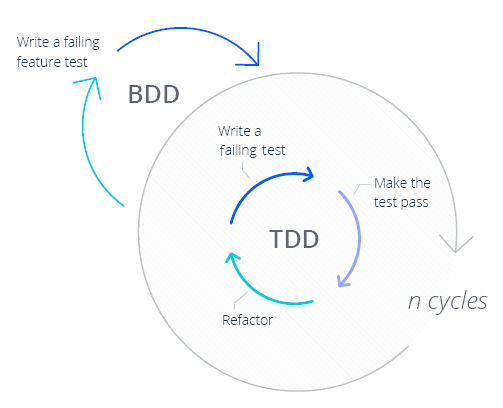
- TDD is a developer-centric workflow where tests are written before code, driving the implementation in small increments (the classic Red-Green-Refactor cycle).
- BDD, on the other hand, builds on TDD by describing behaviors in a shared language (often English-like sentences) that anyone on the team can understand, from developers to business stakeholders.
Understanding BDD (Behavior-Driven Development)
Feature: Login functionality
  As a registered user, I want to log into the site so I can access my account.

  Scenario: Successful login
    Given the user is on the login page
    When the user enters valid credentials
    Then they should be redirected to their dashboard
Collaboration Benefits of BDD
Implementing BDD in Automation (Cypress & Playwright)
-
BDD with Cypress: Cypress doesn’t support Gherkin natively, but it can be integrated with Cucumber through a preprocessor.
For example, using the
cypress-cucumber-preprocessorplugin, you can write the above feature as a.featurefile and then implement steps in JavaScript. A step definition might look like:
Here we’re using Cypress commands (// stepDefinitions/loginSteps.js import { Given, When, Then } from 'cypress-cucumber-preprocessor/steps'; Given('the user is on the login page', () => { cy.visit('/login'); // navigate to login page }); When('the user enters valid credentials', () => { cy.get('#username').type('alice'); cy.get('#password').type('correcthorsebatterystaple'); cy.get('button[type=submit]').click(); }); Then('they should be redirected to their dashboard', () => { cy.contains('Welcome, alice').should('be.visible'); });cy.visit,cy.get, etc.) inside the step definitions. The strings inGiven(...)and others correspond to the sentences in the Gherkin scenario. When you run Cypress with the Cucumber plugin, it knows how to parse the feature file, find matching step definition functions, and execute them. The benefit is that the test logic is shared and reusable, if another scenario saysGiven the user is on the login page, it will reuse the same code above. This promotes consistency across tests. -
BDD with Playwright: Playwright can also be used in a BDD style by leveraging Cucumber (or a similar Gherkin engine).
For example, using the @cucumber/cucumber npm package, you’d write feature files and have step definitions that use Playwright’s API.
It’s very similar in structure to the Cypress example, just using Playwright’s methods. For instance:
In Playwright’s case, you typically launch the browser in a hook (using a// stepDefinitions/loginSteps.js (Playwright example) const { Given, When, Then } = require('@cucumber/cucumber'); const { expect } = require('@playwright/test'); Given('the user is on the login page', async function () { await page.goto('https://myapp.example/login'); }); When('the user enters valid credentials', async function () { await page.fill('#username', 'alice'); await page.fill('#password', 'correcthorsebatterystaple'); await page.click('button[type=submit]'); }); Then('they should be redirected to their dashboard', async function () { // Check that some dashboard element is visible await expect(page.locator('text=Welcome, alice')).toBeVisible(); });Beforefrom Cucumber to set uppage), and then use thatpagein your step definitions (as shown above). The semantics are the same: our Gherkin steps are mapped to code that manipulates the browser, and assertions are done via Playwright’s expect.
When('the user adds {string} to the todo list', async function (item) {
  await page.fill('.todo-input', item);
  await page.click('.todo-button');
});
Understanding TDD (Test-Driven Development)
- Write a Test – e.g., “Ensure the login function returns a user object when given valid credentials.” You write a small test for that (which will fail initially, because the function isn’t written yet).
- Run it & See it Fail – The test failing is important: it confirms that the test is able to catch the absence of the feature. It sets a goal.
- Implement Code – Write the minimal code to make that test pass (implement the login function returning a dummy user for the valid credentials).
- Run tests & See them Pass – Now the test passes (green).
- Refactor – Clean up the code, improve structure, while ensuring tests still pass. Then repeat for the next bit of functionality.
TDD-Style Testing in Cypress/Playwright
// cypress/integration/login.spec.js
describe('Login', () => {
  it('allows a user with valid credentials to log in', () => {
    cy.visit('/login');
    cy.get('#username').type('alice');
    cy.get('#password').type('correcthorsebatterystaple');
    cy.get('button[type=submit]').click();
    cy.contains('Welcome, alice').should('be.visible');
  });

  it('shows an error message for invalid login attempts', () => {
    cy.visit('/login');
    cy.get('#username').type('alice');
    cy.get('#password').type('wrongpassword');
    cy.get('button[type=submit]').click();
    cy.contains('Invalid username or password').should('be.visible');
  });
});
test('allows a valid user to log in', async ({ page }) => {
  await page.goto('/login');
  await page.fill('#username', 'alice');
  await page.fill('#password', 'correcthorsebatterystaple');
  await page.click('button[type=submit]');
  await expect(page.locator('text=Welcome, alice')).toBeVisible();
});
Challenges of BDD in Practice
-
Stakeholder Engagement (or Lack Thereof): BDD’s whole premise is collaboration, but in many organizations,
the product owners or other non-technical stakeholders rarely actually read the Gherkin scenarios in the repo, let alone contribute to writing them.
After an initial workshop or two, the task of creating and maintaining feature files often falls entirely to QA engineers or developers.
Without business people regularly reviewing those
.featurefiles, the “common language” becomes a bit moot. It can degrade into just another way for testers to write tests (only now with extra steps). In fact, even the Cucumber team notes an anti-pattern where scenarios become long and detailed such that the product owner doesn’t understand them and “sees no value in them”. If your Given/When/Then steps get too low-level (e.g. talking about clicking buttons and entering fields in Gherkin), you might lose the interest of the business entirely. This is a sign that the intended collaboration isn’t happening. - Overhead of Maintaining Feature Files & Step Definitions: BDD introduces additional artifacts to maintain, every test scenario is specified in a feature file and implemented in code. This duplication means more upkeep. Requirements change? You have to update the English description in the feature file and ensure the underlying step definition code still matches. As the suite grows, managing hundreds of feature files and keeping step definitions DRY (Don’t Repeat Yourself) can become cumbersome. There’s also a learning curve: team members must learn Gherkin syntax and the framework (like Cucumber), on top of the test framework like Cypress/Playwright. If only one or two people on the team really understand the BDD framework well, it can become a bottleneck. Cucumber itself is a powerful tool but can introduce complexity e.g. dealing with parsing expressions, organizing steps, hooking it into test runners, etc. This is extra complexity that pure code tests don’t have.
- BDD is Not a Silver Bullet: Some teams adopt BDD hoping it will magically improve quality or communication, without changing their processes. They might write scenarios after development (treating BDD as just another testing style), which misses the point of driving development. In such cases, BDD can feel like needless ceremony. Cucumber scenarios that are written by automation engineers after the fact are essentially just a verbose layer on top of a traditional test. If the collaboration and shared understanding isn’t front-loaded, the feature files risk becoming stale documentation or, worse, extra work that no one finds useful.
- Tooling Limitations: Integrating Cucumber with tools like Cypress or Playwright works, but it can have quirks. For example, using the Cypress Cucumber preprocessor may slow down test execution compared to vanilla Cypress. One user reported their test run doubling in duration after switching to Cucumber (from 5 minutes to ~13 minutes) (Tests are too slow taking the double amount of time than when using Stock Cypress with Mocha · Issue #587 · badeball/cypress-cucumber-preprocessor · GitHub). This was a specific case, but it highlights that there can be performance overhead or integration issues. Also, certain capabilities of the underlying test framework might be harder to use via BDD layers (e.g., sharing state between steps, parallel execution setup, etc., require additional considerations in a BDD framework). It’s not insurmountable, but it’s another aspect to manage.
Why TDD is More Efficient for QA Automation
- Directness and Speed: When you write tests directly in code, you cut out the middleman. There’s no translation from English to code at runtime, you just write what you want to happen using the test framework’s API. This often means you can get a new test up and running faster. For example,
- adding a new test in Cypress is as simple as writing another
it(...)block with the steps. - In a BDD framework, adding a new scenario might involve writing the Gherkin and then writing new step definitions (or reusing some).
- Easier Maintenance and Refactoring: Test code is code, and thus benefits from the tools and practices we use to maintain code. In a pure code test suite, if you need to refactor a locator or change a flow, you do it in your IDE with refactoring tools, run the tests, and you’re done. In a BDD suite, you might have to update step definitions and possibly tweak wording in feature files to keep them consistent. There’s also a risk of duplicate step definitions if not managed carefully (e.g., two similar Given phrases that do the same thing). Refactoring those can be trickier. With TDD, since tests are code, you can version control and diff them easily, and they tend to be more compact. The focus is on the automation logic itself. In short, there are fewer moving parts to synchronize, which generally means less maintenance hassle.
- Performance: As mentioned earlier, introducing a BDD layer can add overhead. The test runner has to parse feature files, match regex to step definitions, etc., which can slow things down slightly. In contrast, a direct test in code runs with minimal abstraction, it’s just calling the framework methods. For large test suites, this difference can add up. The Cypress team continuously optimizes the core framework, but if you add an extra parser on top (the Cucumber preprocessor), you’re somewhat on your own for performance tuning. In one case, tests took roughly 2.5x longer using the Cucumber plugin than plain Cypress. While that’s just one data point, it resonates with a common sentiment that less layering = faster execution. For CI pipelines where time is critical, this matters.
- Clarity for Automation Developers: There’s an argument that Gherkin is easier to read for non-devs, but for those of us writing and debugging the tests (QA engineers, SDETs, developers), reading the code directly can be clearer. You see exactly what the test does, with no indirection. You don’t need to jump to a step definition to know what “When the user enters valid credentials” really means in terms of code – the test code itself shows entering “alice/password123” in fields. For a developer or tester, that’s very explicit. We can also comment our code or use descriptive variable names to make code-based tests just as understandable as a Gherkin scenario. And since typically other developers on the team don’t mind reading code, the test being in code isn’t a barrier for them. The only people who might not read it are non-technical stakeholders, but as we discussed, those stakeholders might not be reading the Gherkin either in many cases. So we often ask: if the feature files are effectively only being read by QA and devs, why not just have them read code, which they’re comfortable with anyway?
- Less Context-Switching: In BDD, you often have to bounce between the feature file and step definition file while writing or understanding a test. In TDD-style, it’s all in one place. This seems minor, but when writing a lot of tests, not having to constantly think “Does this sentence match exactly the regex in the step def?” or “How do I phrase this action in Gherkin syntax?” frees up mental energy. You just write the test steps as code. That direct translation from thought to code can make writing tests feel more straightforward.
- Alignment with Development Practices: Developers are used to TDD (or at least writing unit tests), which are code-based. Having QA automation in a similar style means developers can more easily jump in and contribute to automation or review tests. It’s all just code in the repository. With BDD, if a developer unfamiliar with Cucumber opens a feature file, they might not immediately know how it ties to the code. It’s one extra thing to learn. Thus, sticking to code can lower the barrier for the whole team to collaborate on tests in the codebase (as opposed to collaborating on feature files outside of it). Ironically, this means a TDD-style approach could foster dev-QA collaboration more easily than BDD in teams where BDD collaboration never really took off.
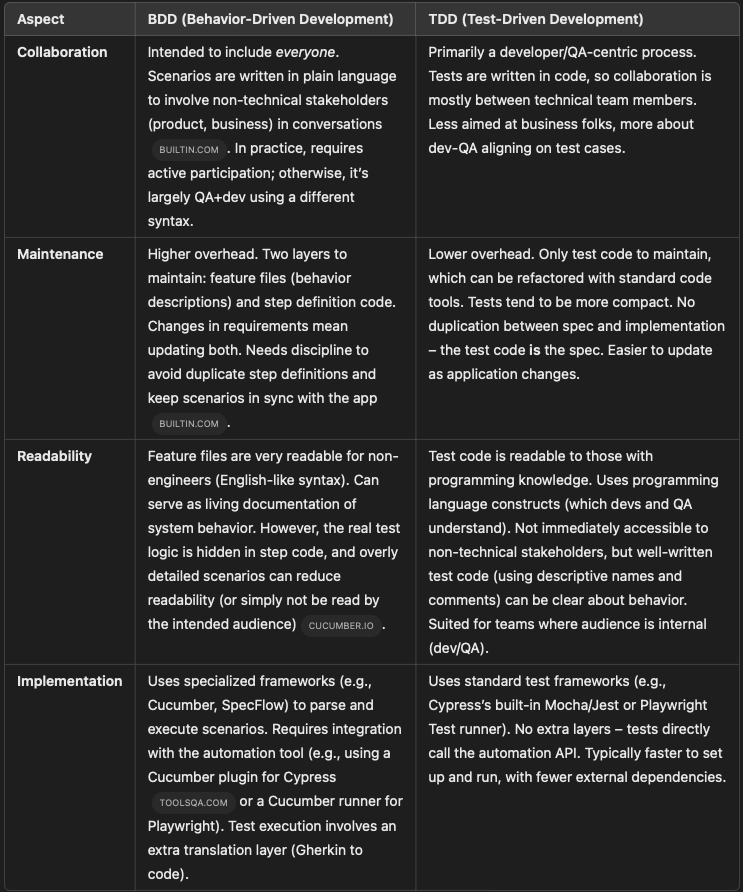
Comparative Table: BDD vs TDD for QA Automation
Conclusion
it("should do X") is up to you and your team’s needs.
Curious to learn more? Subscribe to my newsletter for more in-depth AI and QA Automation content. Cheers!